

LLMs are changing how we write code, and Google’s latest experiment takes that shift straight into spatial computing. They call it Vibe Coding XR, and it’s exactly what it sounds like: you describe an XR experience in plain English, and Gemini spits out a working, physics-aware WebXR app for Android XR headsets in under 60 seconds.
I’ve been following the “vibe coding” trend since it started making rounds — the idea that you can just tell an AI what you want and get working software without touching a keyboard. It works well enough for 2D web stuff and simple 3D scenes. But XR has always been the hard case. Prototyping for extended reality usually means wrangling fragmented perception pipelines, fighting with Unity or Unreal, and integrating low-level sensor data. It’s a mess. Google’s team at XR Blocks and Gemini Research wanted to see if they could skip all that.
The workflow is surprisingly clean
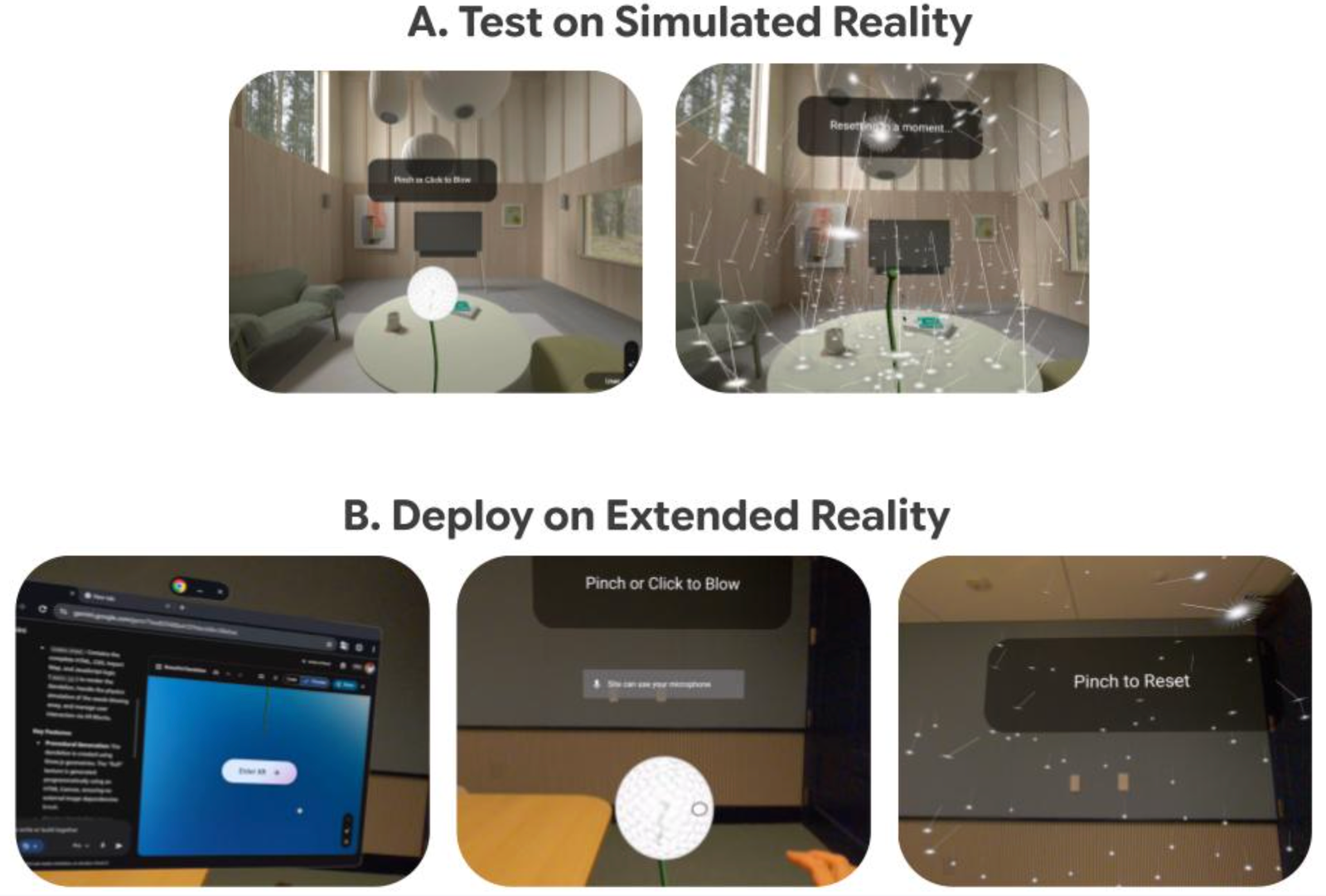
You open the XR Blocks Gem in Chrome on an Android XR headset — say, the Galaxy XR — or just on your desktop. Type or speak a prompt like “Create a beautiful dandelion.” That’s it. Gemini uses multi-step planning to figure out scene layout, perception hooks, and interaction logic based on templates from the XR Blocks framework. Then it builds the app.
On the headset, you pinch the “Enter XR” button and the dandelion appears, animated, ready to be blown away with a gesture. Want to iterate? Tweak the prompt, hit generate again. There’s also a simulated reality mode in desktop Chrome so you can test interactions before deploying to the headset. Depth sensing, hand tracking, physics — those work best on actual hardware, but the simulator handles the basics.
This is higher than I expected in terms of speed. The team claims under 60 seconds from prompt to functional app. I’ve seen demos of similar attempts from other labs, and they usually stumble on the physics or the hand interaction. Google’s advantage here is that XR Blocks was built from the ground up for this kind of rapid prototyping — it’s not a retrofitted game engine. The framework handles spatial logic automatically, so Gemini doesn’t have to guess at coordinate systems or collision boundaries.
What this actually means for developers
If you’ve ever built a prototype for a VR or AR headset, you know the pain. You spend three days getting the environment set up, another two getting hands to track correctly, and then you realize the idea itself was bad. Vibe Coding XR lets you validate concepts in minutes instead of days. That’s not just convenient — it changes what you’re willing to try.
Experienced developers can use this to test new UIs, 3D interactions, or spatial visualizations before committing to a full implementation. Educators can build interactive demos for natural science or mechanics without hiring a dedicated XR engineer. The shareable public links mean you can send a prototype to a colleague and get feedback without them needing a dev environment.
That said, this isn’t a production tool. The generated apps are prototypes — functional, but not optimized. You wouldn’t ship a vibe-coded experience to users. But as a rapid iteration loop, it beats the hell out of the current workflow.
The technical side
The system relies on Gemini’s long-context reasoning combined with specialized system prompts and curated code templates from XR Blocks. The templates act as guardrails — they constrain the output to valid WebXR patterns while giving Gemini enough flexibility to interpret creative prompts. The team has been iterating on this for a year, and it shows. The demo video (linked in the original post) shows a dandelion prompt turning into a fully interactive scene with physics and pinch interaction in under a minute. No manual coding, no debugging.
Google will be showing this live at ACM CHI 2026 at their booth. If you’re attending, it’s worth stopping by to see whether the demo holds up under real conditions. The live demo link is also available now if you want to try it yourself.
My take
This is one of those tools that sounds gimmicky until you actually need it. If you’re not building XR prototypes, it’s easy to dismiss as a toy. But anyone who has struggled through the XR development cycle knows how badly we need faster iteration. The fragmented ecosystem of SDKs, runtimes, and hardware profiles makes XR the worst platform to prototype on. Vibe Coding XR doesn’t solve all of that, but it solves the first and most painful step: turning an idea into something you can see and touch.
The real test will be how well it handles complex prompts — not just “dandelion” but “a physics simulation of a solar system with gravitational pull and collapsible planets.” That’s where most AI code generation falls apart. If Gemini can handle that level of spatial reasoning, this becomes genuinely useful. If not, it’s a neat demo that stays a demo.
Either way, it’s a step in the right direction. XR needs better tools, not just better hardware.

Comments (0)
Login Log in to comment.
Be the first to comment!