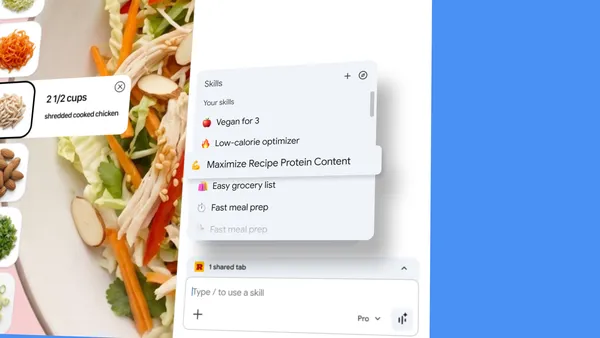

I’ve been using AI in Chrome for a while now, and honestly, the biggest friction point has always been repetition. You find a prompt that works beautifully — say, “convert this recipe to vegan” — and then you have to type it out again on every single page. It’s tedious and defeats the purpose of having an AI assistant.
Google just announced a fix for that, and it’s called Skills. It’s rolling out now to Gemini in Chrome on desktop, and it’s basically a way to save your best prompts as one-click tools.
How Skills work
The idea is simple: when you write a prompt that you know you’ll want to use again, you save it directly from your chat history. Next time you need it, just type forward slash (/) or click the plus sign (+) in Gemini in Chrome, pick your saved Skill, and it runs on whatever page you’re viewing. You can even select multiple tabs to run it across.
Early testers have already built some genuinely useful workflows. Things like calculating protein macros from any recipe, generating side-by-side spec comparisons across shopping tabs, or scanning lengthy documents for key info. These aren’t earth-shattering, but they’re the kind of small, repetitive tasks that add up over a workday.
There’s also a library of pre-built Skills
Google isn’t leaving you to figure it all out from scratch. They’re launching a library of ready-to-use Skills for common tasks. Want to break down ingredients on a product page? Or find a gift by cross-referencing budget with recipient interests? There’s a Skill for that. You can add one with a click, and if it’s not quite right, you can edit the underlying prompt to better fit your needs. That’s a nice touch — they’re not locked down.
Privacy and control
Skills inherit Chrome’s existing security and privacy safeguards. That means they’ll ask for confirmation before doing anything potentially sensitive, like adding an event to your calendar or sending an email. Google also mentions automated red-teaming and auto-update capabilities, which is standard fare but worth noting.
Your saved Skills sync across any signed-in Chrome desktop device, and you manage them by typing forward slash then clicking the compass icon. It’s clean and unobtrusive.
The real value
What I like about this approach is that it doesn’t try to reinvent the wheel. It’s a pragmatic layer on top of what already works. Instead of forcing you to learn yet another AI interface, it just makes your existing prompts more portable and reusable. That’s the kind of incremental improvement that actually sticks.
Is it going to change your life? Probably not. But if you find yourself typing the same AI prompt more than twice a week, Skills will save you a few seconds each time. Over a month, that adds up to actual time back in your day. And honestly, that’s more than most AI features can claim.
Comments (0)
Login Log in to comment.
Be the first to comment!